Windows operating systems have a built in security center that monitors the activities or existence of Automatic Updates, Windows Firewall and antivirus (provided by third party). When one or more security component do not been installed, or disabled or turned off or not working, then windows security alert popup will highlight the section in yellow or red for warning and critical attention. It can really frustrate you when it occurs randomly, but it is a wake call for your computer security so that you can fix it.

Step 1: Open 'Administrator Tools' from 'Control panel'. (if you don't see it, double click on 'Performance and Maintenance' first)
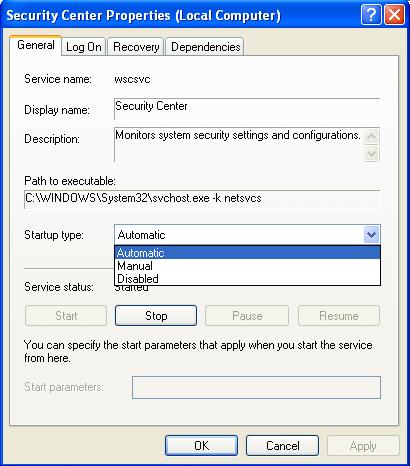
Step 2: Now double click 'Services' and again double click on 'Security Center' and select 'properties' with right-click option.
Step 3: Now click on 'General' tab and change the setting from Automatic to 'Disabled'. (also find here how to stop Windows rebooting after automatic updates...)
It will permanently disable security center pop-ups forever and click on 'Stop' button at the bottom of the dialog window to stop security center immediately during current log on session.
It’s time to restart your computer and check the result. I hope it will work.
Note: After disable the Security Center, you won’t be any security warning again. But, by turning it off, your system may be expose to virus, malware and spyware threat too if your anti virus program is not functioning unknowingly or accidentally. So whenever you disable your windows security center, use high-quality virus removal software to keep your system safe.